

When you finish a job, you want to send the invoice, thank your client and get back to work. What you don't want is to spend the next few weeks wondering whether anyone has seen it. A missing purchase order or an email sent to the wrong person can leave you chasing payment for work everyone was happy with.
You can't control when a client pays, but you can make your invoice easy to approve and easy to pay. By the end of this guide, you'll know what to include, how to get it through accounts payable and what to say when payment is late. You'll also have an email template to copy and a screenshot walkthrough for sending your first invoice in Payhere.
What should an invoice include?
Your client knows what you did. The person paying the bill might not. At a larger company, accounts payable—the team that handles supplier bills—may need to match your invoice to an order and get a colleague's approval before they can pay it.
Make it detailed enough for them to understand without asking the colleague who hired you. Give them these details so they can move it along:
- Your business details: business or trading name, contact email and billing address; include registration or tax details where required.
- The customer's details: the correct legal or business name, billing address and accounts contact.
- A unique invoice number: a consistent reference such as INV-104 helps both sides identify the request.
- Invoice date and payment due date: use an explicit calendar date rather than relying only on “net 30.”
- The work supplied: list recognizable deliverables, service dates or the billing period.
- Quantities, rates and totals: show the calculation, currency, applicable taxes, agreed discounts and any deposit already paid.
- Payment instructions: include the payment link and any agreed alternative method.
- A purchase order or project reference: ask for this before sending if the customer needs one to approve payment.
For example, describe the work like this:
Website copywriting: five service pages, October project, $1,200 USD
Unlike “Marketing services,” that description tells finance what they're approving. Add your client's project reference and the name of the person who approved the work. If you've already received a $300 deposit, show the $900 balance clearly so nobody has to ask whether you've deducted it. These are example service prices, not Payhere fees.
Before your first invoice, ask your contact: “Does finance need a purchase order, a supplier form or anything else from me?” A purchase order (PO) records the client's authorization to buy the work. If they need one, ask for it before you start. That gives your contact time to arrange it, rather than leaving you waiting after delivery.
Choose payment terms before you send
Putting “due on receipt” on an invoice won't help much if your client has already agreed different terms with you. Talk about payment when they accept your quote, while there's still time to decide whether the arrangement works for both of you.
Due on receipt asks for payment when the invoice arrives. Net 7, net 14 or net 30 generally means payment is due that many days after the invoice date. Agree when the clock starts, then put an exact date on the invoice: “Payment due November 14, 2026 — net 14 from October 31.” Spell out the month to avoid US/UK date confusion.
Ask finance: “Who needs to approve this?” and “Is there a submission deadline for your payment run?” Some companies pay suppliers in batches. Knowing their cutoff helps you avoid missing a run by a day. It doesn't change your agreed due date.
Send promptly after the agreed milestone. Finance needs the payment terms and deadline on the invoice, not your entire negotiation history. Attach an approval or timesheet if they've asked for one. For bigger projects, agree a deposit or milestone payments so you're not paying the costs of the whole job before any money comes in.
Late fees or pausing work should also be agreed in advance and checked against applicable law. A surprise penalty in a reminder is more likely to start an argument than help the invoice along.
Send an invoice email that's easy to act on
Your email doesn't need to be a sales pitch or an apology. A friendly thank-you and a few useful details are enough. Rather than just writing “invoice attached,” tell the reader which project it's for, how much is due and when to pay. They'll know what to do without opening the attachment first.
Put your business name and invoice number in the subject so finance can find it later. Use their billing email address or required supplier portal. Name any PDF attachment YourBusiness-INV-104.pdf, rather than invoice-final-v3.pdf, so it's easy to match to the email.
A payment link gives your client a direct route to checkout instead of asking them to copy bank details. Put it beside the amount due in the email and, if your invoice editor supports links, on the invoice itself. First check that finance can use that payment method. If they must pay by bank transfer, give them the agreed transfer instructions instead.
Copy this into your email app and replace the bracketed placeholders. Remove the purchase-order sentence if you don't need it. This is suggested wording for your own email, not a message Payhere sends for you.
Subject: Invoice [invoice number] from [your business] — due [due date]
Hi [name],
Thanks for working with me on [project]. Attached is invoice [invoice number] for [work delivered or billing period].
The balance due is [amount and currency], payable by [due date]. Your purchase order reference is [PO number].
You can pay securely here: [insert the correct payment link].
Please let me know if you need anything else to arrange payment. Thank you!
[your name]
[your business]
Open the payment link before sending. Does it show the right business, currency and outstanding balance, including any deposit already deducted? One click gets your client to checkout; they may still need to enter payment details or authenticate with their bank.
Chasing a late invoice without making it awkward
You've had a good relationship with the client, so you don't want a payment reminder to sound like an accusation. It doesn't have to. A calm question about an agreed payment is reasonable, and it gives your contact a chance to sort out a delay they may not know about.
First, check that payment hasn't already arrived, including through another agreed method. Then reply to the original email a business day or two after the deadline. Keep it friendly and specific:
Hi [name], just following up on invoice [number] for [amount and currency], which was due [date]. Could you confirm when payment is scheduled? Here's the payment link again: [link]. Please let me know if anything is holding it up. Thanks, [your name].
If the reply is “it's with accounts,” ask what still needs to happen before it can be paid. Is it awaiting approval, missing a PO or scheduled for payment? Now your contact has something specific to resolve, rather than another reminder to forward.
If it's still unpaid after about a week, ask for a specific payment date. If email gets you nowhere, call the person handling it. Follow the call with a short email confirming what you agreed, so you both have a record. For large invoices, checking that approval is underway before the deadline can save you this conversation later.
If there's a genuine dispute, deal with it directly. Don't create a new invoice number to chase the old one, or add unagreed penalties. These are manual follow-up suggestions, not an automatic Payhere reminder schedule.
Retainers: stop asking for the same payment every month
With a fixed monthly retainer, you already know the price and the service. Why give yourself and your client another payment task each month? A recurring payment removes that task; a recurring invoice doesn't.
With Payhere's subscription payment links, your client authorizes payments at an agreed price and billing interval. They don't have to pay manually each month. Agree the amount, start date, service and cancellation terms before they subscribe. You'll still need to check for failed payments.
Individual invoices give the client a chance to check each month's bill before paying. That's useful when hours or expenses change, or finance must approve every period. The cost is the monthly admin and possible chase. Set a calendar reminder to prepare those invoices manually, and make the billing period clear.
For a fixed-price retainer, I recommend recurring payments if your client's finance process allows them. Keep any required accounting invoices matched to the payments; a subscription doesn't mean Payhere automatically prepares and emails itemized invoices. Agree when the new arrangement starts, and stop sending payment requests for money the subscription has already collected.
How to create and send an invoice in Payhere
Have your Payhere account and Stripe connection ready, along with the agreed work, customer details, amount and due date. The screenshots below are real Payhere local-development UI captures supplied in October 2026, using fictional demo data. They are not production-account captures or a single continuous customer transaction.
Create the invoice and choose the customer
Open Invoices and choose New invoice. Select the existing customer, or create a customer if this is your first invoice to them. Check the billing email rather than assuming it matches your project contact's address.
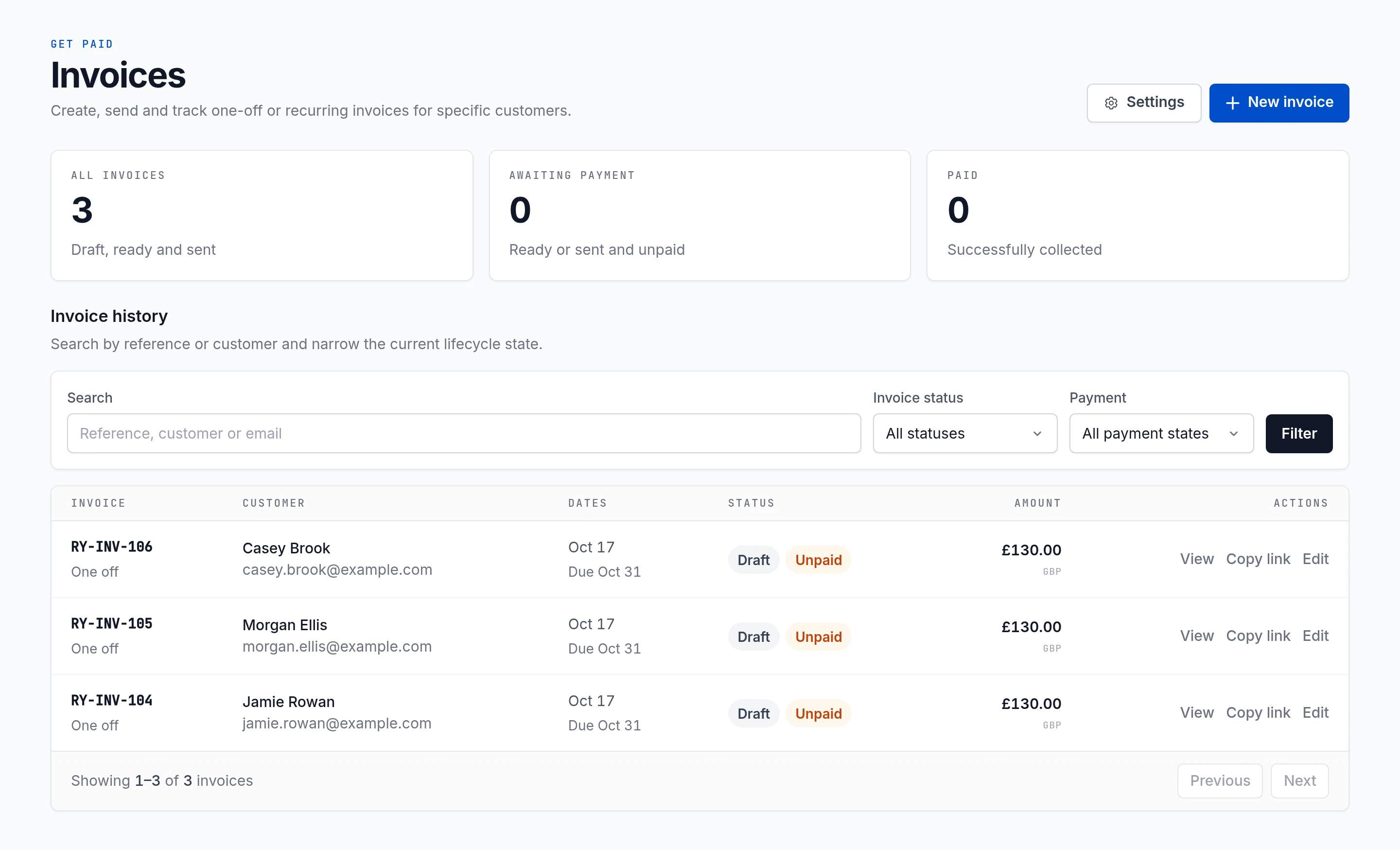
Local-development capture, October 2026; fictional demo invoices. Add the work, amount and due date
Enter the invoice date, payment due date and any reference. Add clear line-item descriptions, quantities and unit prices. The example shows two private yoga sessions at £65 each: a £130 line amount. The GBP example demonstrates the interface, not a fee or a recommended price.
Save a draft if details need confirming. Check the currency and the full amount requested against your agreement before approving it.
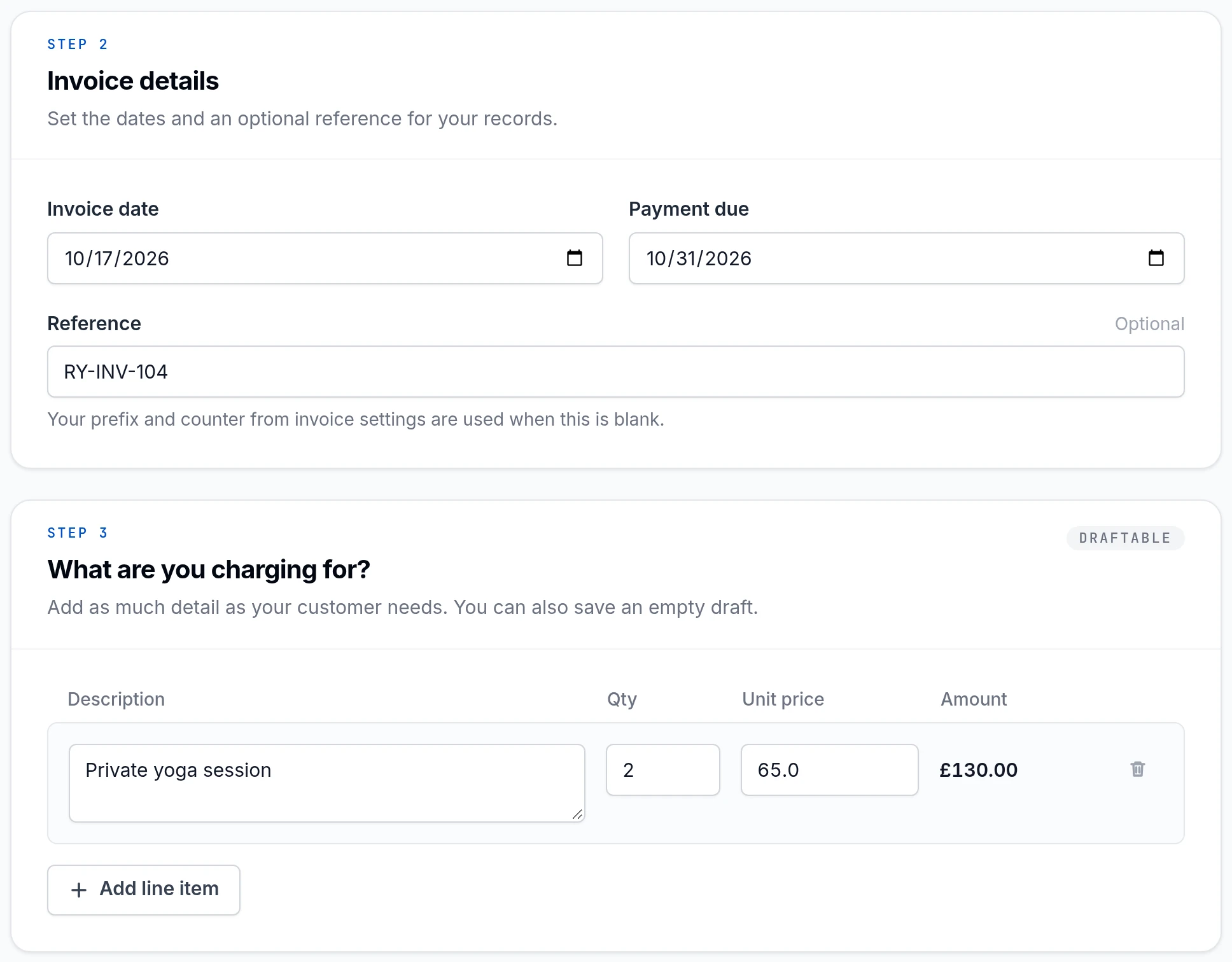
Local-development capture showing invoice details and a sample line item. Review, approve and send
Review the customer, work, balance and deadline, then approve the invoice and choose Send invoice. Payhere's online invoice gives the client a route to payment without manually copying bank details. Keep any separate handover email brief and use the invoice-email checklist above for context.
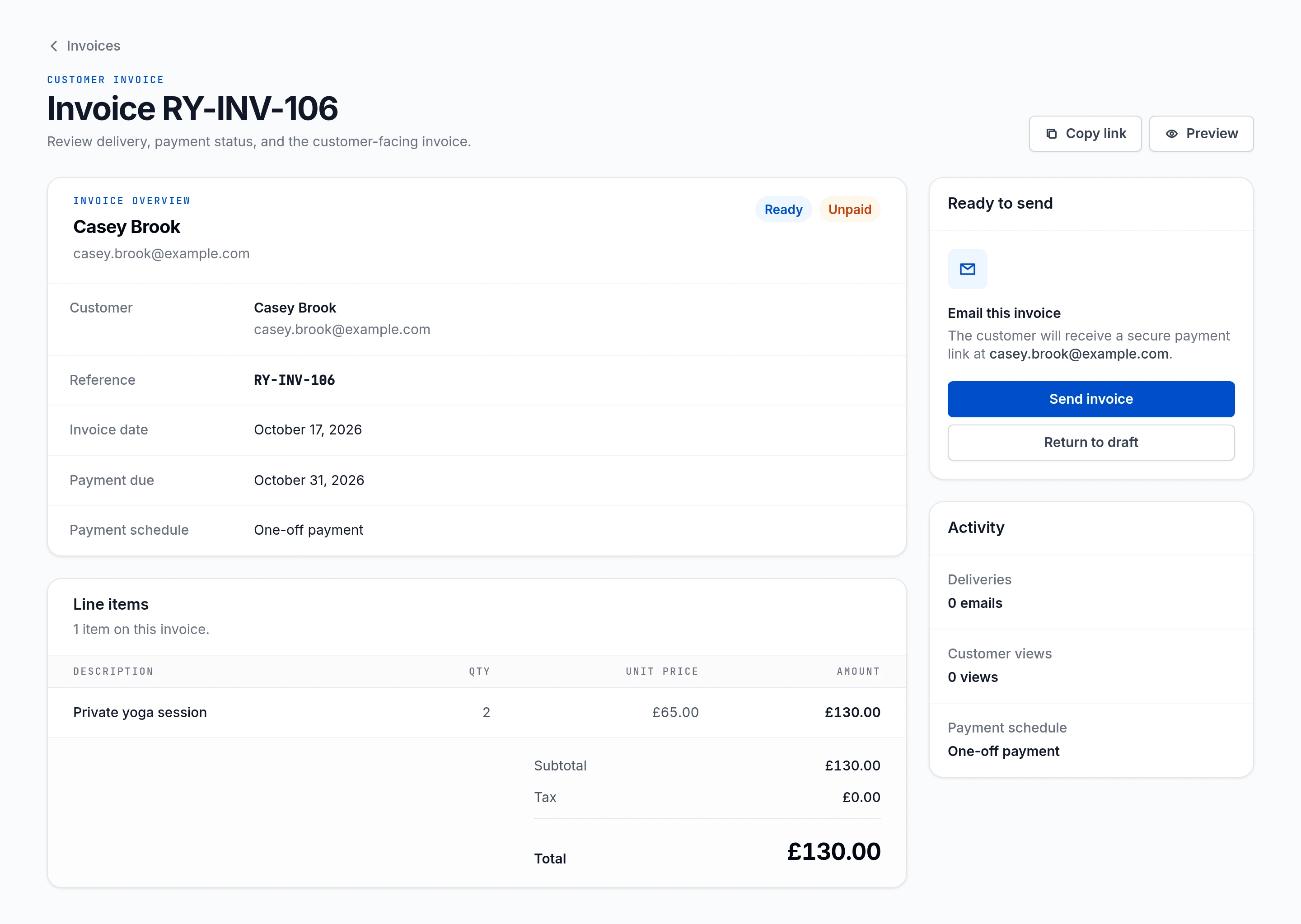
Separate fictional demo invoice in the local-development interface. After sending, check payment status in Payhere before closing the invoice in your accounting records. Sending is not the same as collecting payment.
Questions about sending invoices
Can I send an invoice by email?
Yes. Send it to the billing contact with the invoice number, amount, due date and payment instructions. Include a payment link and attach a PDF if the client needs one for their records. Follow any required purchase-order or supplier-portal process.
Is a payment link the same as an invoice?
No. A payment link opens checkout; an invoice records what is owed, by whom and when. You can put a payment link on an invoice, but the link alone does not replace required invoice information.
What payment terms should I use?
Agree terms with the client before starting. Due on receipt, net 7, net 14 and net 30 are common options. State an exact due date as well as the term, and account for the client's approval process.
Can Payhere collect recurring retainer payments?
Payhere supports subscription payment links for an agreed recurring price and billing interval. That is different from automatically preparing and emailing itemized invoices. Prepare variable retainer invoices manually and keep any accounting invoices reconciled with payments already collected.
Start with one accurate invoice and one obvious way to pay. Use Payhere invoicing for a customer-specific request, or a payment link alongside an invoice you already prepare elsewhere.
Create and send your first invoice