Site Builders
WixWebStartsApp Builders
BubbleGlide AppsTools
QwilrZoomGuides
10 fundraising ideas for sports teams, without a sales catalogueAdd payment links to your WebStarts websiteChurch fundraiser ideas for youth: trips, camps and retreatsCreate payment plans, minimum terms and free trialsCreating a one-off donation payment linkCreating a recurring donation payment linkCreating a recurring payment linkCreating your Payhere storefrontEmbed your Wix recurring payment linksGet paid on Zoom with Payhere payment linksHow to create a coupon code in PayhereHow to make a gift certificate and sell it onlineHow to monetize your community with recurring paymentsHow to sell online courses without a big course platformHow to send an invoice with a payment linkIf you are a creator, how do you get paid?Is Stripe good for small business? A simpler way to use itNo-code subscription payments using Bubble and PayherePayment link advanced settings and brandingSmall church fundraising ideas you can run this monthUsing custom fields to collect more informationUsing Payhere with QwilrAccept Payments & Subscriptions in Zoom Calls with Payhere

Need a simple way to get paid on Zoom? It's easy with Payhere!
Once you have created your payment link, simply drop the URL link into the chat when you are on the call. Below is a step by step guide on how to do so!
1. Create your payment link using Payhere, choosing any of the following.
Fixed amount
- Recurring (weekly, monthly, quarterly or yearly)
- One-off
Donation amount (customer will enter amount)
- Recurring (weekly, monthly, quarterly or yearly)
- One-off
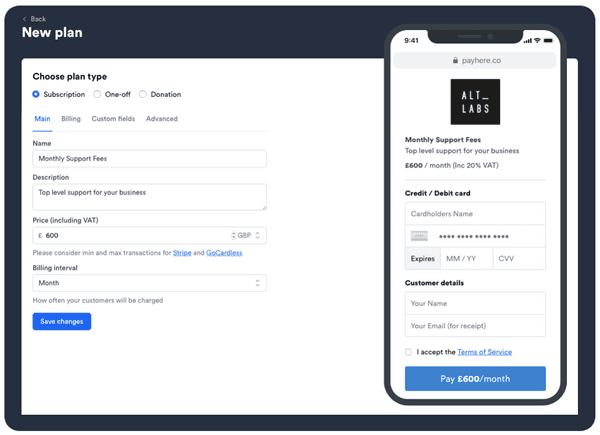
2. Copy the link that we have created for you.

3. Drop the link into the Zoom chat.
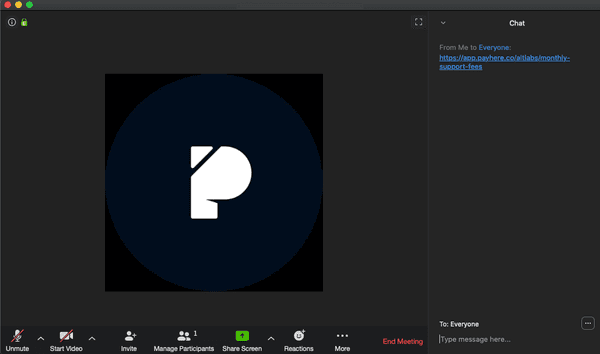
4. Link is opened, details entered and the payment is made!